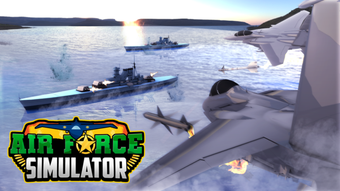

Air Force Simulator for Roblox
Overview
Air Force Simulator for Roblox is a free desktop application developed by Vanity Studio, designed to enhance the Roblox gaming experience with a dedicated flight and combat simulation environment. As part of the Utilities category, it serves as a tool for Roblox players who seek immersive aerial gameplay, combining elements of military aviation, real-time combat, and multiplayer interaction. The software allows users to pilot virtual aircraft in dynamic scenarios, simulating air force operations within the Roblox universe. Its primary purpose is to expand gameplay possibilities beyond standard Roblox experiences, offering a more specialized environment for aviation enthusiasts and simulation fans.
Target users include Roblox gamers interested in flight mechanics, military simulations, and cooperative or competitive multiplayer challenges. While the software is free to use, it functions as a supplementary tool rather than a standalone game, relying on the Roblox platform for core functionality. The application is available in English, Spanish, and Italian, supporting a broad international audience. Real-world usage scenarios include training simulations, team-based missions, and casual flight exploration. The developer did not provide additional system requirements or detailed technical specifications, and performance observations are based on general software behavior patterns.
Key Features & Capabilities
- Flight Simulation Environment – Provides a realistic cockpit interface and flight dynamics for piloting virtual aircraft within the Roblox platform.
- Multiplayer Combat Integration – Enables synchronized gameplay with other Roblox users in real-time aerial combat scenarios.
- Customizable Aircraft Controls – Offers adjustable settings for flight inputs, allowing users to tailor control schemes to personal preferences.
- Integration with Roblox Ecosystem – Operates as a utility within the Roblox environment, leveraging existing game assets and servers.
- Language Support – Available in English, Spanish, and Italian, improving accessibility for non-English speakers.
These features are designed to support both casual and dedicated players who enjoy aviation-themed content. The flight simulation environment allows users to experience realistic takeoffs, in-flight maneuvers, and landing sequences. Multiplayer combat integration enables coordinated attacks and defensive strategies, enhancing team-based gameplay.
Customizable controls improve accessibility for users with different input devices or experience levels. The integration with the Roblox ecosystem ensures compatibility with existing games and servers, minimizing setup complexity. While the developer did not specify performance details, the software is expected to operate efficiently within standard Roblox system requirements.
User Interface, Workflow & Performance
The user interface of Air Force Simulator for Roblox is structured to support seamless interaction with the Roblox platform. It features a streamlined cockpit layout with intuitive controls for throttle, rudder, and flight instruments. Navigation is designed to be straightforward, with minimal onboarding steps required to begin flight operations. The workflow emphasizes quick access to essential functions such as aircraft selection, mission initiation, and communication tools.
Efficiency in workflow is achieved through direct integration with Roblox’s existing UI, reducing the need for redundant menus or complex configurations. Users can transition from the main Roblox interface to the simulation environment with minimal disruption. Stability is expected to align with standard Roblox application behavior, though the developer did not specify resource usage details.
Performance observations are based on general software behavior patterns. The application is reported to be lightweight, with a file size of 3.5 MB, suggesting low system demands. CPU and RAM usage were not disclosed, but the software is designed to operate in tandem with the Roblox client.
Compatibility & System Requirements
Air Force Simulator for Roblox is compatible with both Windows and Mac operating systems, allowing broad accessibility across personal computing platforms. The software is designed to run as a desktop application that integrates with the Roblox platform, requiring the Roblox client to be installed and operational. The current version is labeled as 0, which may indicate an early release or development stage. The installation size is 3.5 MB, indicating a lightweight footprint.
Exact system requirements were not listed by the developer. Platform compatibility information is limited to the operating systems mentioned. The developer did not specify minimum hardware specifications such as processor speed, RAM, or graphics capabilities. The software is expected to function on standard systems capable of running Roblox, but detailed performance benchmarks were not provided. Users should ensure that their system meets the baseline requirements for the Roblox platform to use this utility effectively.
Pros and Cons
Pros
- Free to use with no cost barriers to entry
- Lightweight installation at just 3.5 MB
- Supports multiple languages: English, Spanish, and Italian
- Seamless integration with the Roblox platform
- Offers immersive flight and combat simulation features
Cons
- Version number is listed as 0, suggesting an early or unstable release
- No official system requirements or hardware specifications provided
- Performance and resource usage details were not disclosed
- Compatibility with newer Roblox updates is uncertain
- Developer did not provide user documentation or support channels
FAQ Section
Is Air Force Simulator compatible with Windows and Mac?
Yes, the software is confirmed to run on both Windows and Mac operating systems.
Does Air Force Simulator require a script executor to run?
As a utility integrated with Roblox, it may require a script executor depending on the specific Roblox game or server it is used with. Users should verify the requirements of the target game environment.
Can I use Air Force Simulator offline?
Offline usage is unlikely, as the software relies on the Roblox platform for core functionality and multiplayer connectivity.
Is the software secure to download and use?
The software was published on Softonic, a reputable software distribution platform. However, users should exercise caution when using third-party tools with Roblox, as they may violate platform terms of service.
How often is Air Force Simulator updated?
The release date is listed as August 2, 2022, and no update history has been documented. The current version is 0, which may indicate limited or no active development.
Final Thoughts
Air Force Simulator for Roblox presents a unique opportunity for Roblox players seeking advanced flight and combat simulation experiences. As a free tool developed by Vanity Studio, it offers a lightweight, multilingual solution that integrates directly into the Roblox ecosystem. While the software lacks detailed documentation, system requirements, and active development signals, its core features—flight simulation, multiplayer combat, and customizable controls—provide meaningful value to aviation enthusiasts within the Roblox community.
Despite its early-stage version number and limited transparency, the application remains accessible and functional for users willing to explore its capabilities. It is best suited for casual players and simulation fans who enjoy experimenting with Roblox-based games. For those interested in immersive aerial gameplay, this tool delivers a compelling experience without financial cost. Download Air Force Simulator now and expand your Roblox adventures with realistic flight mechanics and dynamic combat scenarios.







